RailyardData-centre design, before the DCIM.

Design the data centre before you build it.

Plan the floor, racks, cabling, power and network topology in one place, and catch problems before anyone is on site. Then hand installers a build pack and load the design into NetBox or Nautobot. Railyard is the step before your DCIM, not another one.

Try it in your browser
  • Free forever plan, no card required
  • Pay only for the handover files
  • 7,000+ device types built in
  • No third-party trackers

Signing in (Google, GitHub, a Microsoft work account or an email code) opens an editable example data centre saved to your account. Trying it in your browser needs no account and keeps your changes in this browser.

Real Railyard example workspace
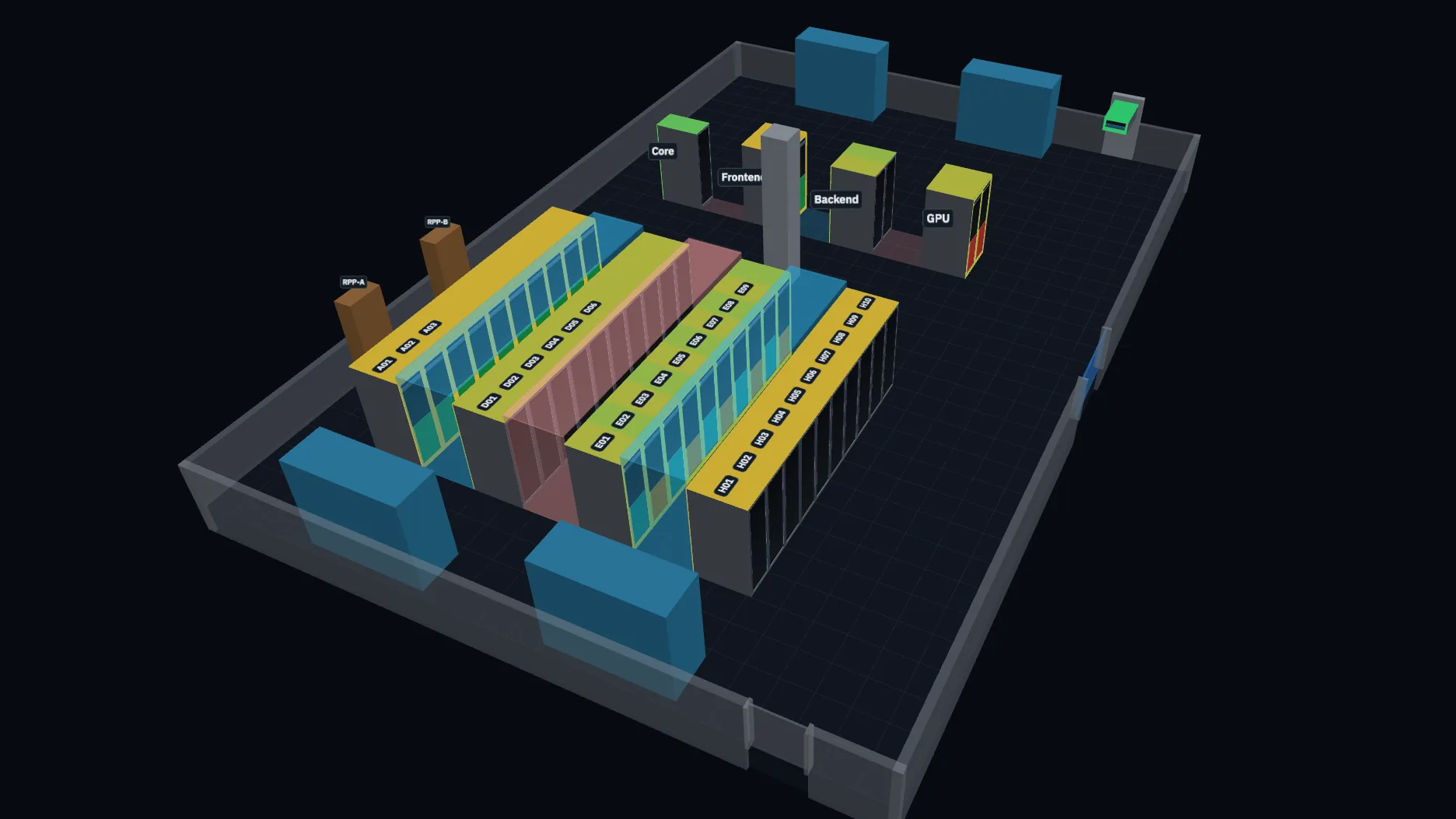
Railyard 3D view of a data hall: four contained rows of racks coloured by power draw, the example's rows beside them, cooling units on the walls, two power panels and a column
Look round the floor before it's builtThe example hall in 3D, racks coloured by power draw: walk an aisle and find a rack. The floor itself is built on the Plan and each rack in its elevation.Open the full screenshot

One design, not four files that disagree

Most builds are still planned across a drawing, a few spreadsheets and someone's memory. Railyard keeps the whole physical design in one place, so problems show up early and everything you hand over agrees.

Already run NetBox or Nautobot? Start from what you have: device and cable CSVs in NetBox's import columns load as they are, and Railyard's open-source NetBox plugin and Nautobot app bring in a whole site from inside your network, then apply the design back. A command-line tool for the same job, railyard-sync, is in early development. Working with NetBox and Nautobot

The usual wayWith Railyard
Racks in a drawing, cabling in one spreadsheet, power in anotherRacks, cabling, power and network topology planned in one place, so every view agrees
Design problems found on site, during the installPower, cabling, clearance and cooling checked while you design, before anything is ordered
Days spent assembling installer paperwork from screenshotsA printable build pack, cable schedules and labels produced from the design
Build progress chased by phone and marked-up printoutsInstallers tick each rack off on a phone, and the Build page shows progress and reported problems
NetBox or Nautobot filled in by hand after the buildImport files your DCIM loads when the design is ready
Design reviews over emailed files and screenshotsBranches, merge requests and approvals on Team

From a sketch to something an engineer can install

Racks, network topology, cabling and power, each in its own workspace over the same design.

  1. Draw the floor, then the racks

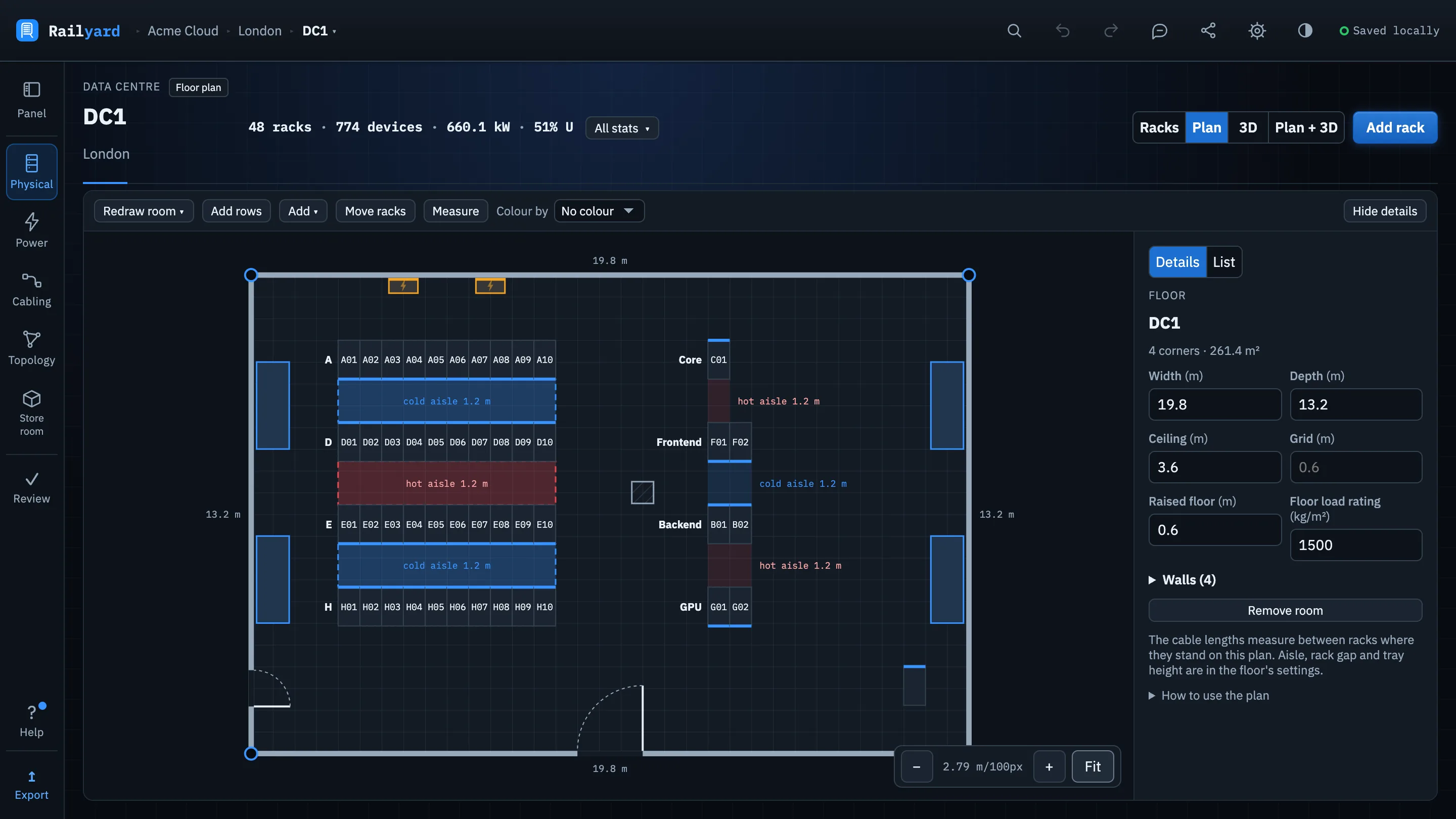
    Draw the hall on the Plan and drag out rows of racks, filled from your own rack templates. Place doors, cooling, containment and power panels, then fit real hardware in each rack with names kept consistent from campus to cabinet. The plan is part of the design, not a separate drawing, so the design review and the cable lengths read it too.

    • Hot and cold aisles from the racks' facing, with containment
    • Clearances, delivery-door fit, cooling capacity and floor loading checked
    • Colour the floor by power, heat, weight or U used, and look round it in 3D
    Floor plans and 3D · 7,000+ device types · naming rules
    Railyard floor plan of a hall with rows of racks, labelled hot and cold aisles, cooling units, power panels and doors
  2. Map the network

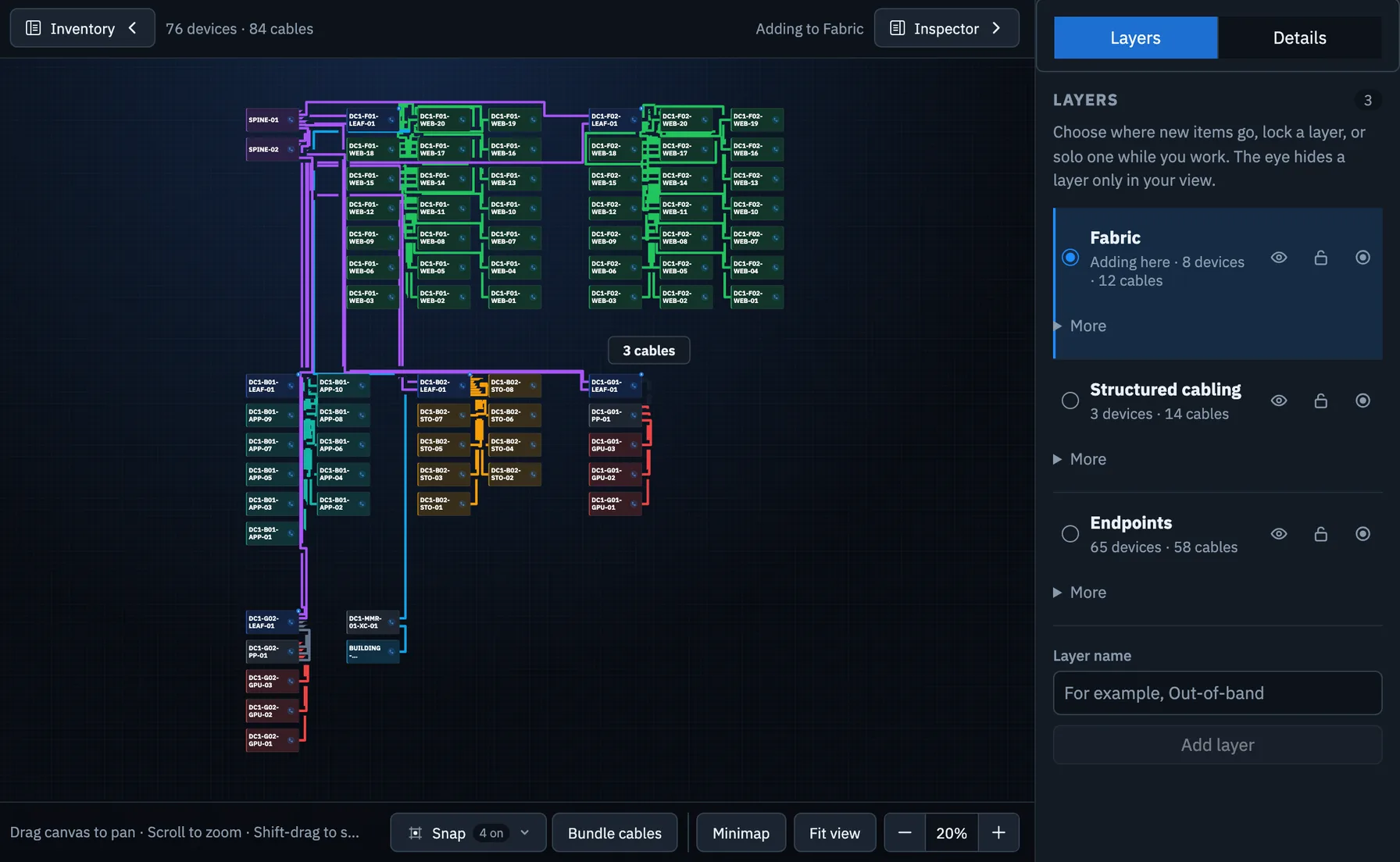
    Create named topologies with user-defined layers. Arrange devices already in your racks, connect their real ports, and see each network fabric as a whole.

    Named topologies · custom layers · real connections
    Railyard Topology workspace showing the example network on Fabric, Structured cabling and Endpoints layers, with spine, leaf, server and storage devices connected
  3. Wire and validate

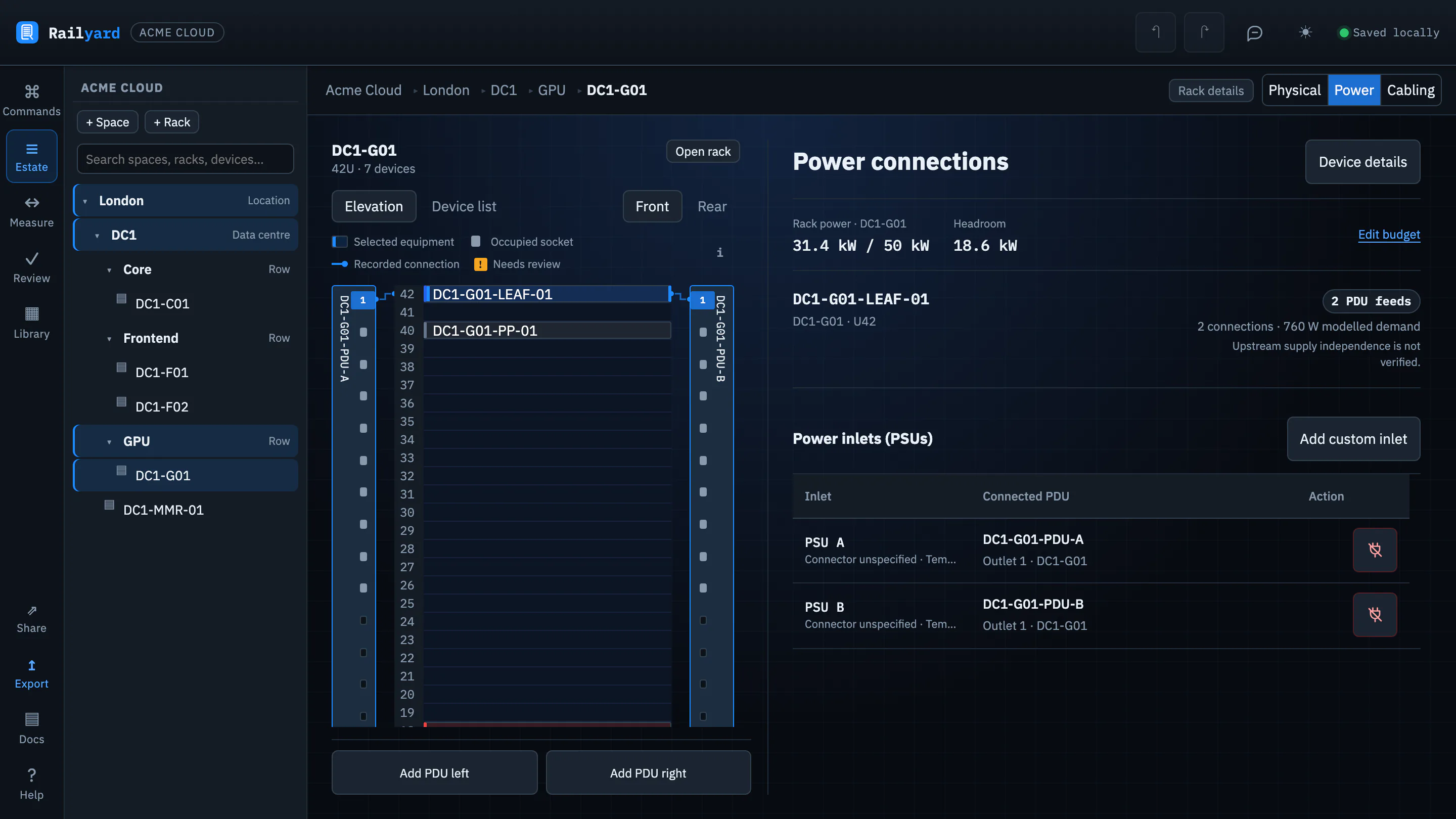
    Use Device wiring for exact ports and optics. Follow physical cables and patch-panel mappings in Complete path, check PDU feeds, and catch power and cabling issues before installation.

    Structured cabling · patch panels · PDU feeds
    Railyard Power workspace showing modelled rack draw, remaining headroom, and two PDU feeds for a leaf switch
  4. Review every change

    Every plan keeps version history and restores an earlier point. On the Team plan contributors work on branches and open merge requests, so a change is compared, discussed and approved before it reaches main.

    • Try a change on a branch while main stays as it is
    • See what the change adds to racks and topology, then approve it
    • Opt in to protected main: it blocks direct edits and can require approvals
    Version history on every plan · branches and merge requests on Team
    Example project London DC Main protected
    MR 24Ready to merge

    Add a redundant core uplink

    core-uplink main

    2 switches placed in racksPhysical
    2 connections mappedTopology
    Approved for this submission1 of 1 required approvals
    Merge into main version history
    Illustrative review in a Team organisation project with main protection on.

Data for your DCIM, a build pack for your installers

Skip the retyping. Every design exports as files your tools already read, and as printable instructions for the people racking and cabling it. Every file here is a real sample, generated from Railyard's example data centre, so you can read the build pack or test-import the NetBox bundle before you pay. Or start from one of the reference designs, from a branch rack to a GPU pod.

Railyard calls these handover files deliverables. A Project Pass covers them for one estate (Railyard's word for a project), and a Pro, Team or Partner plan for every estate. Community previews them on one rack of your own design, and the raw project file is free on every plan.

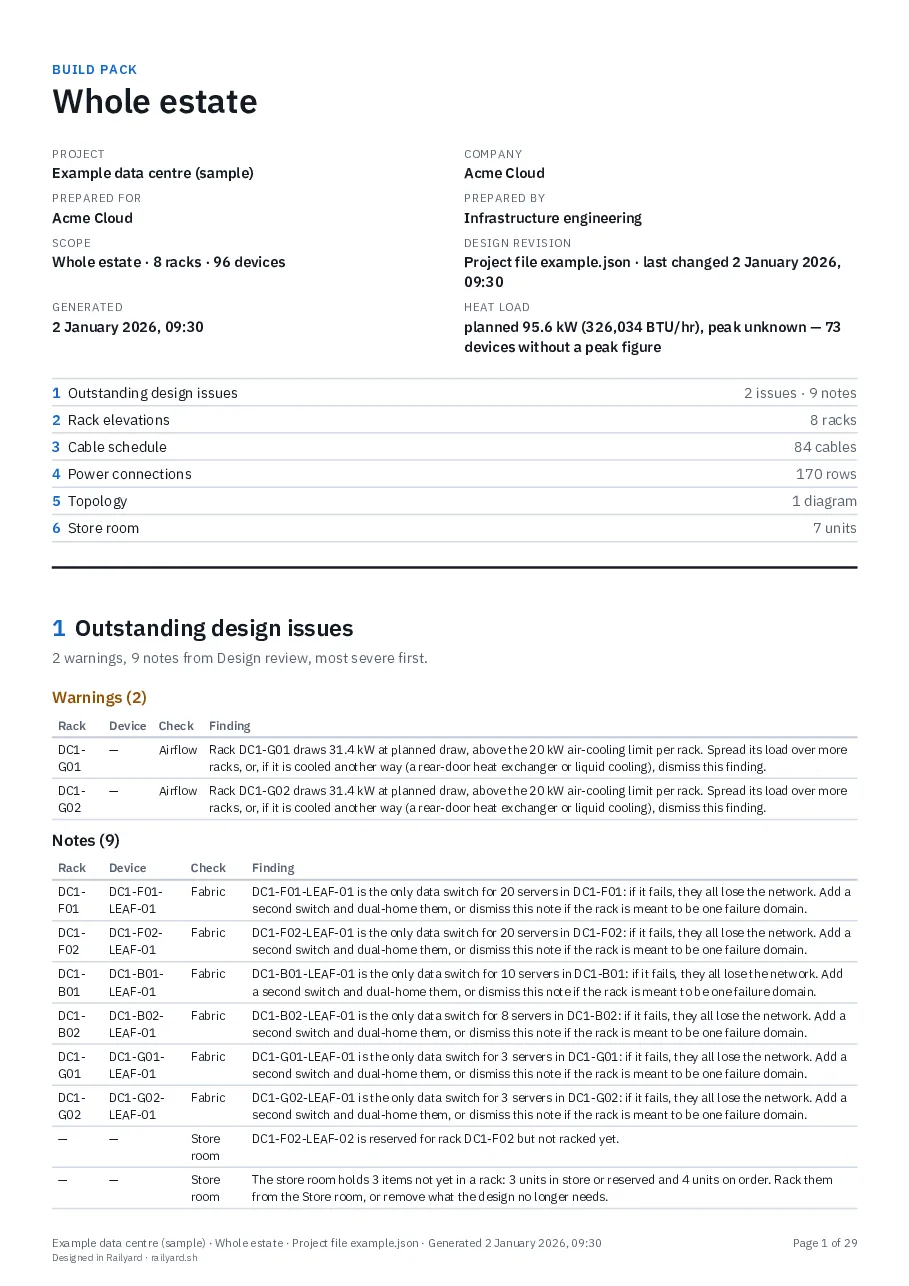
  • Build pack cover: project, scope, design revision, contents and the outstanding design issues
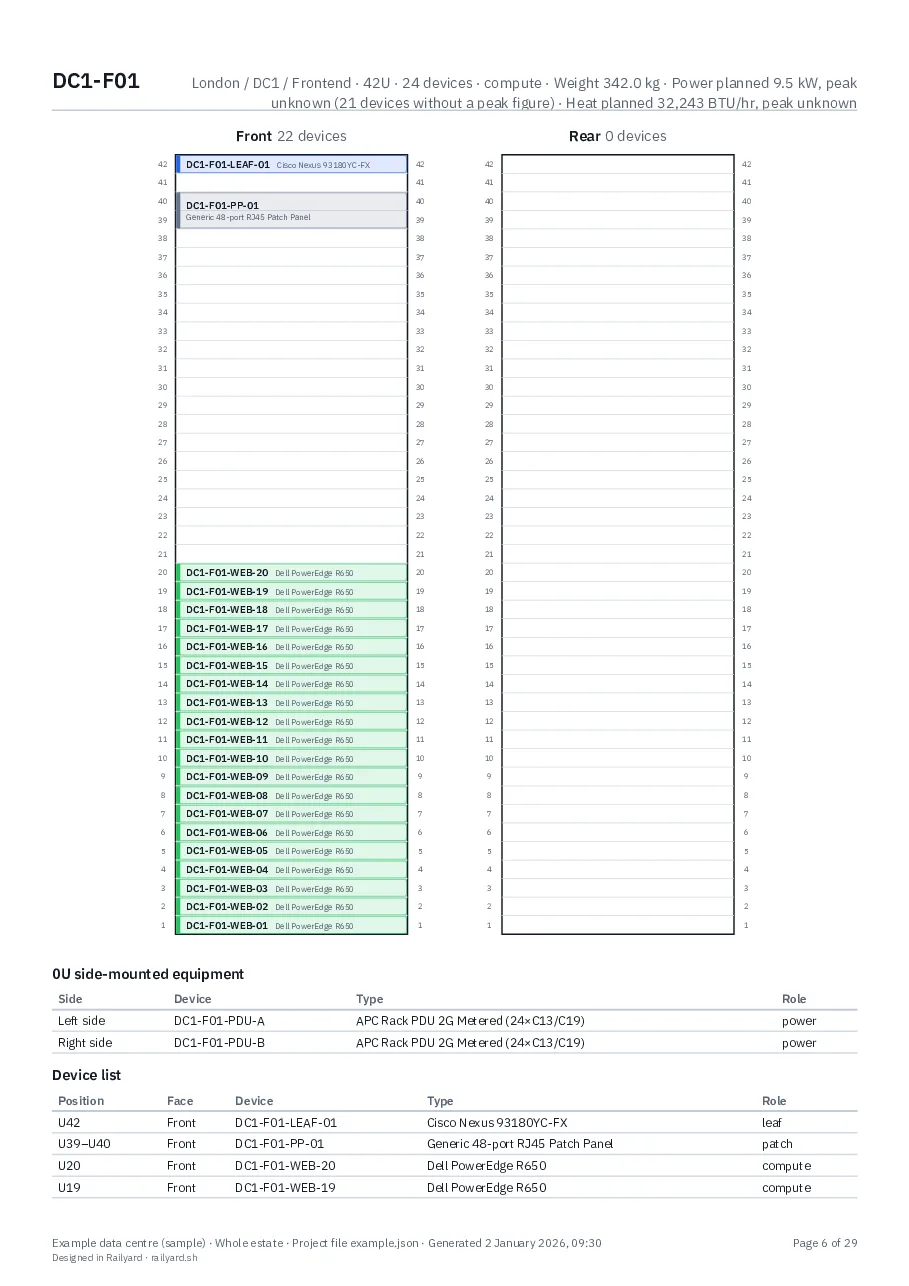
  • Build pack rack page: front and rear elevations of rack DC1-F01 with its devices
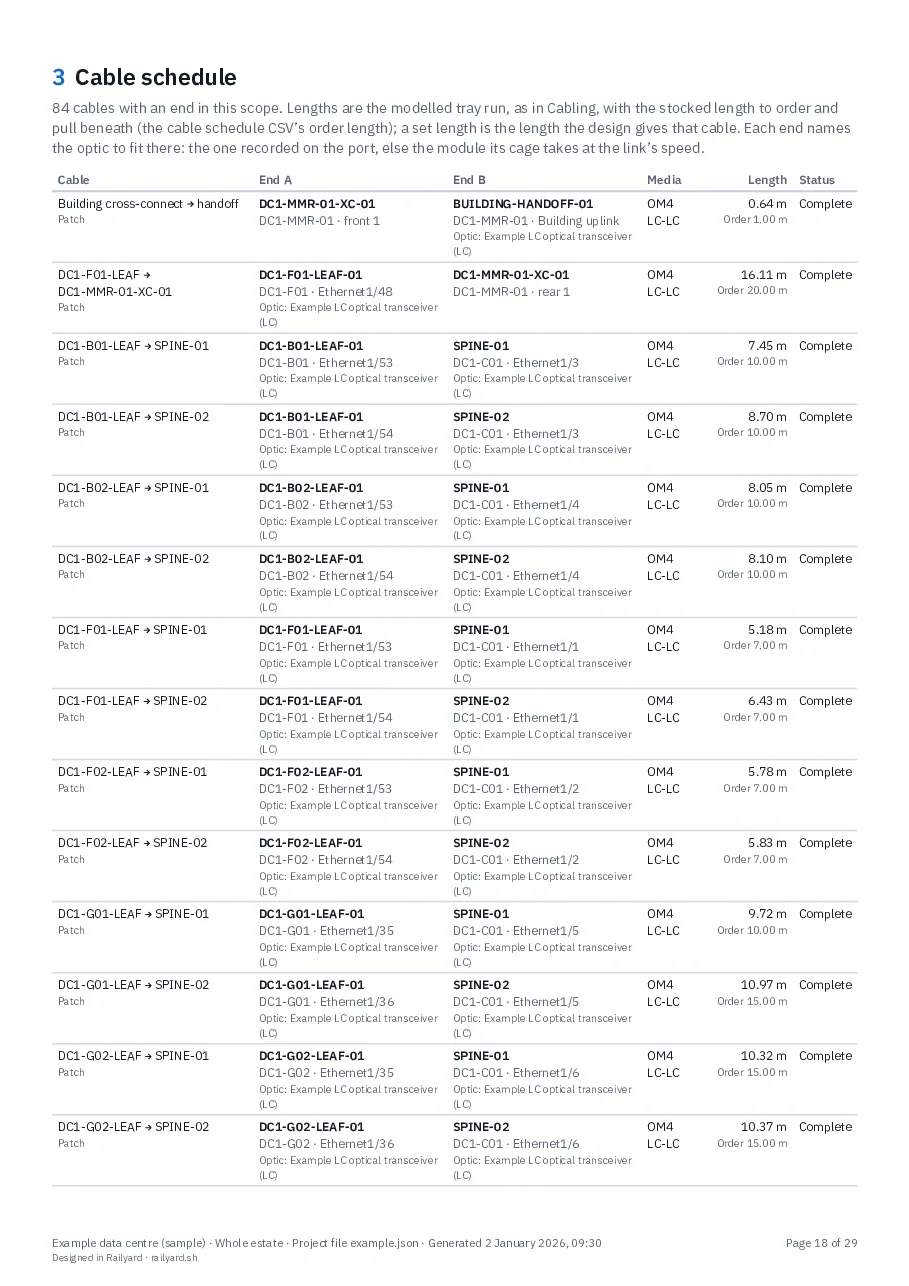
  • Build pack cable schedule: each run with both ends, media and the length to order
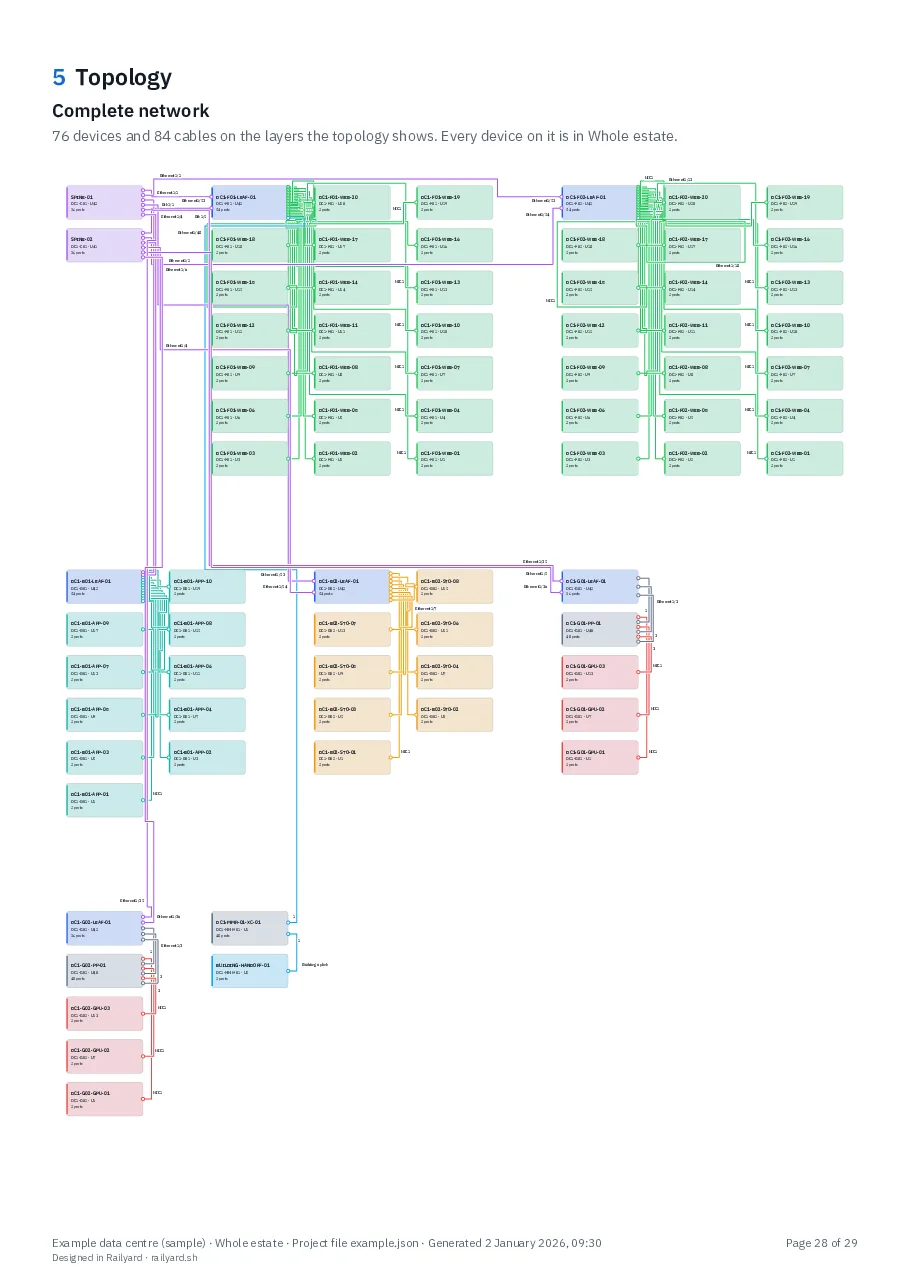
  • Build pack topology: the example network drawn by layer
Sample build pack, pages 1, 6, 18, 28 of the example data centre's pack. A sample design, not a real site. Open the whole PDF
  • Build pack (PDF)

    One printable handover for a rack, row, site or the whole estate: outstanding review findings, front and rear elevations, the cable schedule, power connections and topology diagrams, with numbered pages.

    Sample build pack (PDF, 29 pages)
  • NetBox 4.x bulk import

    CSV files in the order NetBox loads them: locations, racks, device types, devices, cables and power. Anything that cannot be matched is reported, not silently dropped.

    Sample NetBox bundle (ZIP)
  • Nautobot 2.x bulk import

    The same design laid out the way Nautobot organises locations, with names adjusted where Nautobot's own rules require it.

    Sample Nautobot bundle (ZIP)
  • Cable schedule and labels

    A per-run working sheet for whoever pulls the cable: both endpoints, port names, media type and an estimated length, plus a wrap label for each end.

    Sample cable schedule (CSV)Sample cable labels (CSV)
  • Power schedule

    One row per device inlet: which PDU outlet feeds each power supply, ready for whoever wires the rack.

    Sample power schedule (CSV)
  • Power report

    Per-rack estimated draw against budget, remaining headroom, PDU count, and the devices whose demand is still unknown.

    Sample power report (CSV)
railyard-sample-cable-schedule.csv, first three runs
cable,kind,media,a_rack,a_device,a_port,b_rack,b_device,b_port,length_m
DC1-F01-LEAF -> SPINE-01,patch,OM4 LC-LC,DC1-F01,DC1-F01-LEAF-01,Ethernet1/53,DC1-C01,SPINE-01,Ethernet1/1,5.181
DC1-F01-LEAF -> SPINE-02,patch,OM4 LC-LC,DC1-F01,DC1-F01-LEAF-01,Ethernet1/54,DC1-C01,SPINE-02,Ethernet1/1,6.425
ACCESS-003,patch,DAC,DC1-F01,DC1-F01-WEB-01,NIC1,DC1-F01,DC1-F01-LEAF-01,Ethernet1/1,3.492

Tick the build off on a phone, rack by rack

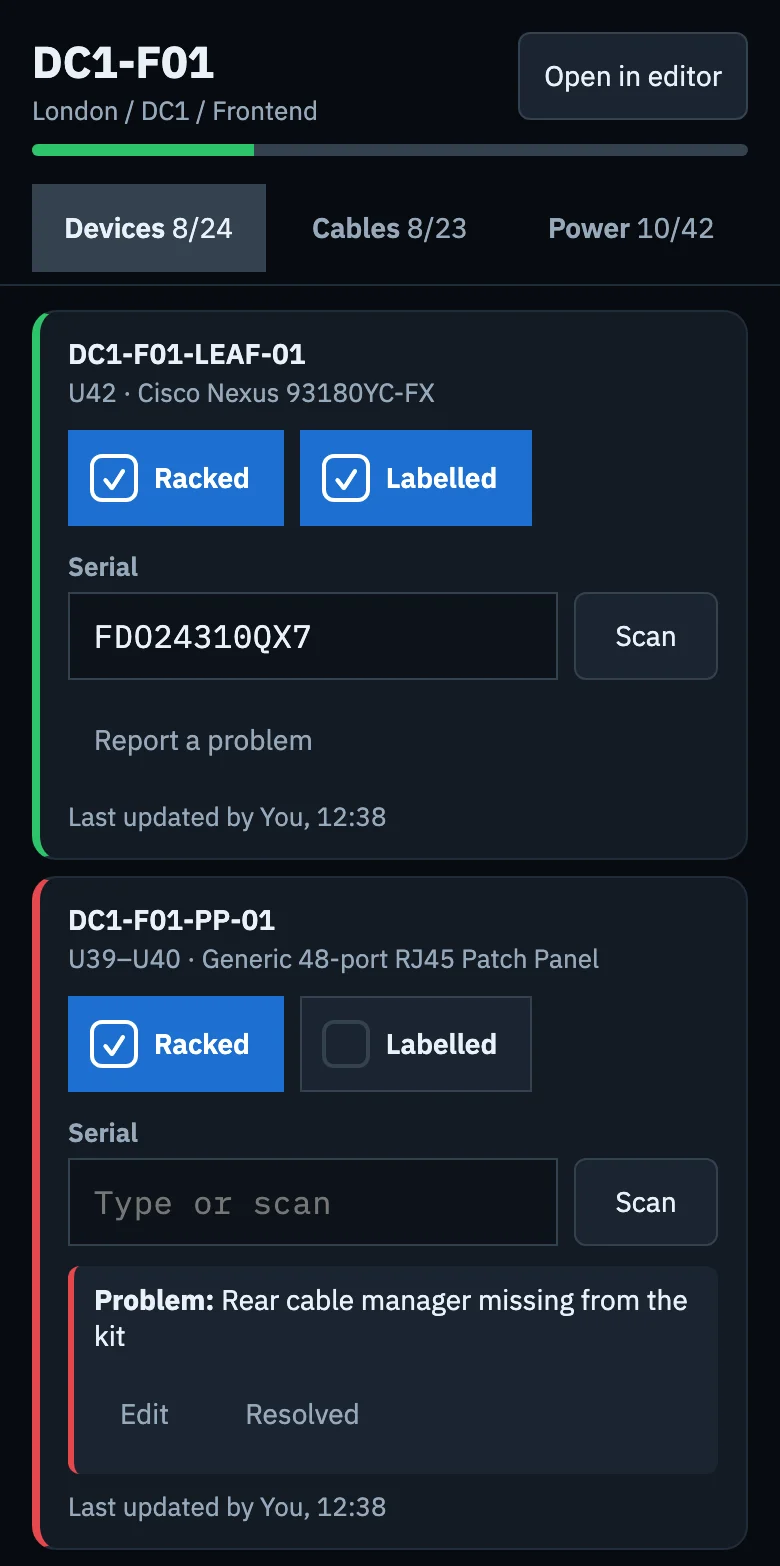
The design carries on into the build. An installer opens a rack's checklist on a phone or tablet and ticks off each device as it is racked and labelled, each cable as it is connected and each power feed as it is plugged in. Progress is kept beside the design and never changes it.

  • No accounts for the crewA project administrator shares a build crew link, and installers record progress under the name they type. Colleagues with an account can record it too, viewers included.
  • Serials and problemsType each device's serial number or scan it with the phone's camera. Report a problem on any item, with photos, and it is marked on that device, rack or cable in the editor.
  • Rack sign-offOnce everything in a rack is ticked, sign it off. Railyard records who signed and when.
  • Progress for the officeThe Build page shows the racks signed off, a burn-up against your start and target dates, who did what today and the open problems.

Recording progress is part of every plan, Community included. What you hand over from it is a deliverable: rack QR labels, which open a rack's checklist on a signed-in colleague's phone, the as-built record of every tick, sign-off and serial read on site, and the handover pack, which files that record with the crew's photos. Those come with a Project Pass or a Pro, Team or Partner plan.

How the as-built record and handover pack work
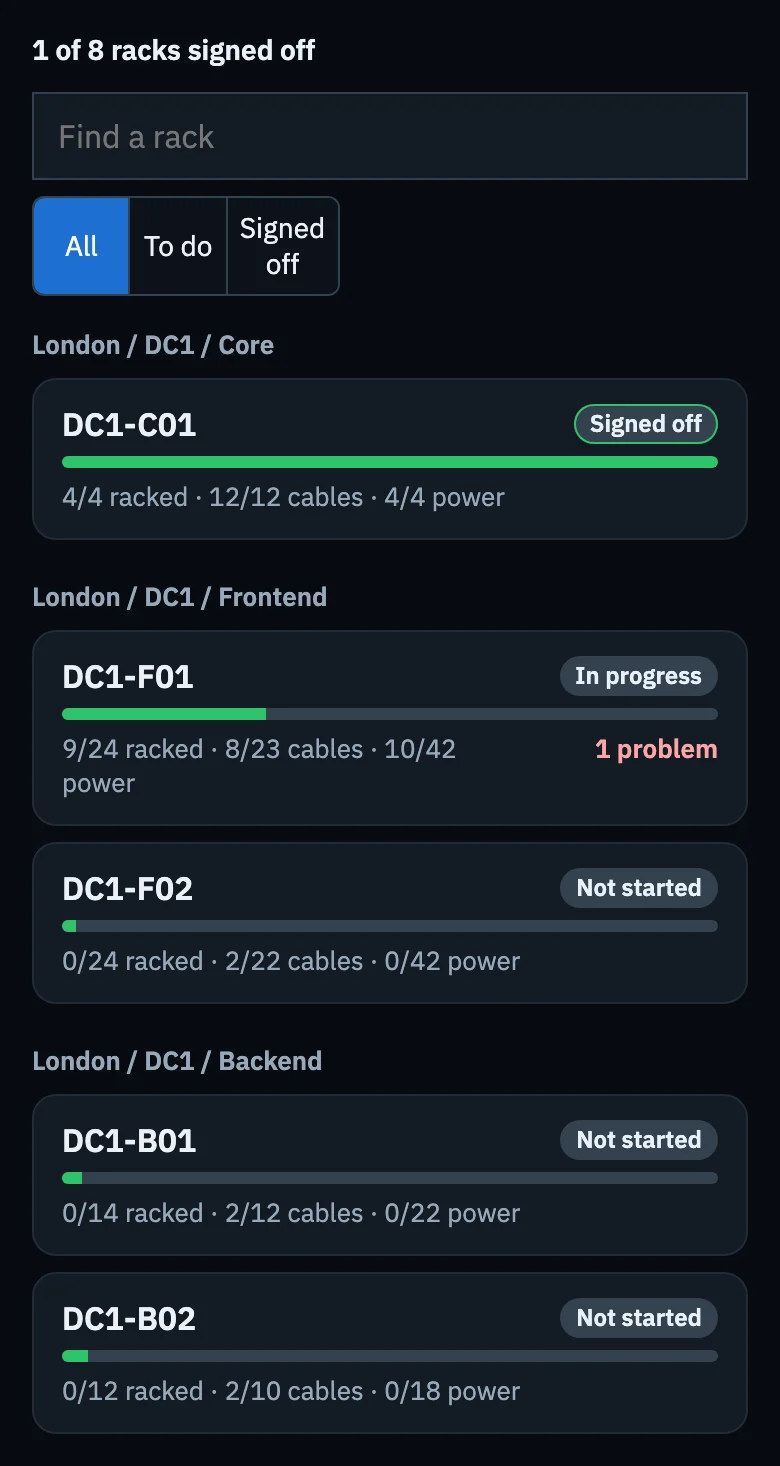
  • Railyard build checklist on a phone listing the example data centre's racks: DC1-C01 signed off, DC1-F01 in progress with 9 of 24 devices racked and one problem, the others not started
  • Railyard build checklist for rack DC1-F01 on a phone: a leaf switch ticked as racked and labelled with its serial entered, and a patch panel racked with a reported problem
The build checklist at phone width, captured from the example data centre with a few items ticked for the picture. A sample design, not a real site.

Judge it on a real design

Signing in opens an example data centre with racks, cabling, power and a network topology already modelled. Move things, break things, export it.

Try it in your browser

Design with your AI assistant

Railyard runs an MCP server, the standard way AI assistants use outside tools. Connect one and it can read your hosted projects and make changes within your Railyard permissions. Works with Claude, Claude Code, Codex, Cursor and VS Code.

Setup guide
  • Add two leaf switches to the top of rack DC1-F01add_rack_devices
  • Connect each web server's NIC1 to its leaf switchconnect_ports
  • Feed both PSUs from the rack's A and B PDUsconnect_power
  • Validate the design and tell me what to fixvalidate_project

Connect Claude to hosted Railyard

In Claude, choose Add custom connector and paste this URL. Sign in to Railyard, review the permissions, then allow the connection.

Connector URL
https://railyard.sh/mcp

Projects stored only in your browser are unavailable through MCP. Review or revoke hosted access in User settings → Connected AI apps.

Run a local MCP serverFor stdio clients and self-hosted Railyard servers

Run npx -y railyard-mcp auth, then create a token under User settings → API tokens. Add it to your client's protected configuration.

Terminal
codex mcp add railyard --env RAILYARD_TOKEN=ry_your_token_here -- npx -y railyard-mcp

This local command uses your personal access token.

Replace ry_your_token_here with your token. It authenticates as you, so treat it like a password.

Design free. Pay for the deliverables.

Design as much as you like on any plan, with version history and your project file always free to download. Pay only when you hand the design over: a Project Pass for one estate, or a Pro, Team or Partner plan for every estate.

Billing cadence

Community

£0free forever

Design anything, free for good.

  • 1 editor
  • Unlimited estates and devices, up to 25 racks per estate
  • Full rack, topology, cabling and power design
  • Version history and restore
  • The raw project file (JSON), free to download and import
  • One-rack previews of the build pack (watermarked), schedules, labels and NetBox and Nautobot bundles

Team

£199per month

For teams designing together.

  • Everything in Pro, for a shared organisation
  • 5 editors included
  • £35/month per additional editor
  • Unlimited viewers and reviewers
  • Up to 500 racks per estate
  • Branches, merge requests, approvals and live collaboration
  • Organisation design standards, checked in every review

Larger teams, partners and self-hosting

No online checkout: tell us what you need and we will price it with you.

Partner

Partner programme, priced with you

For consultancies and integrators delivering for clients.

  • Everything in Team
  • 10 editors
  • Up to 1,000 racks per estate

Self-hosted

Priced with you

Run Railyard on your own infrastructure.

  • Deployed on servers you control
  • Every feature and deliverable included
  • Size, licence and price agreed with you
  • Support and terms agreed with you
Talk to us

Prices are in GBP and exclude VAT. Any VAT or sales tax that applies is calculated and shown at checkout before you pay; if you are buying as a consumer, the VAT-inclusive total is shown before you confirm. Terms §5 and §6 cover billing, renewal and cancellation.

What counts as a deliverable

The files you hand to someone else, each generated from your saved design. Open a sample of each:

Paid with them: the handover pack, as-built record, bill of materials, optics and DAC list, rack QR labels, power cord list and Nautobot Design Builder bundle. The raw project file (Railyard JSON) is not a deliverable: downloading, importing and exporting it is free on every plan. Rack limits only stop an estate growing. Nothing is ever deleted, and a plan that ends never makes a design read-only.

Frequently asked questions

What is Railyard?

Railyard is data centre design software. You plan floor layouts, rack elevations, structured cabling, power and network topology in one browser-based workspace, and check the design for problems. Then you hand it over as installation documents and as import files for NetBox or Nautobot. A built-in library holds 7,000+ real hardware models. It is for planning a build or a change, not for monitoring a live site.

What is the difference between DCIM software and data centre design software?

DCIM software records and manages equipment that is already installed. Design software covers the stage before that: deciding where racks and devices go, how they are cabled and powered, and whether it all fits. Railyard is design software. When the design is agreed, you export it to a DCIM such as NetBox or Nautobot, so the record starts out matching the plan.

Do I still need NetBox or Nautobot?

Yes, and that is the point. Railyard is the design step before your source of truth, not a replacement for it. Model racks, topologies, cabling and power while the build is still being decided, then export import files your DCIM can load. Railyard does not discover, monitor or operate a live estate.

Can Railyard replace spreadsheets and Visio drawings for rack planning?

Yes, for the physical design. Rack elevations, cable schedules, power budgets and network diagrams all come from one design, so they cannot drift apart the way separate spreadsheets and drawings do. To get started, you can import existing racks, devices and cables from CSV files.

How much does Railyard cost?

Designing is free on the Community plan, with up to 25 racks per estate (an estate is Railyard's word for a project). The files you hand over cost £149 once for one estate with a Project Pass, or come with Pro at £49 a month or £490 a year and Team at £199 a month or £1,990 a year, which includes 5 editors and unlimited viewers. Prices exclude VAT.

Is the Community plan really free?

Yes. Community is free forever and needs no credit card. It includes 1 editor, unlimited estates and devices, up to 25 racks per estate, the full rack, topology, cabling and power design tools, version history and the raw project file. You pay only when you need the deliverables.

What is a deliverable?

Deliverables are the files you hand to someone else: the build pack PDF, cable schedule, cable and rack labels, power schedule, power report, NetBox bulk-import bundle and Nautobot bulk-import bundle. The outputs made from the same data are paid with them: the handover pack, as-built record, bill of materials, optics and DAC list, rack QR labels, power cord list and Nautobot Design Builder bundle. They come with a Project Pass for one estate, or with a Pro, Team or Partner plan for every estate, while the estate is within its plan's rack limit. Community previews them on one rack of your own design. The raw project file (Railyard JSON) is not a deliverable: downloading and importing it is free on every plan.

What is a Project Pass?

A one-off payment of £149 that covers every deliverable for one estate in your personal space for 6 months, and raises that estate's limit to 100 racks. Nothing renews. When the pass ends the estate stays fully editable and its project file stays free to download; only its deliverables stop.

What happens when a paid plan or pass ends?

Your designs stay exactly where they are and stay editable. Nothing is deleted, hidden or made read-only. You keep full design access and the raw project file. Only deliverables, and creating new branches and merge requests, stop until you renew, upgrade or buy a Project Pass. Community's rack limit then applies to growth, and an estate already over it stays editable and can shrink.

Can I run Railyard on my own servers?

Yes. Self-hosted is an annual licence whose size, support and price we agree with you, rather than a plan bought online. A self-hosted server runs without billing, so every feature and deliverable is available and the software itself enforces no plan limits.

How can I sign in, and is single sign-on available?

Sign in with a one-time 8-digit email code, Google, GitHub, or a Microsoft work or school account. Owner, editor, and viewer roles are available. SAML/OIDC federation to your own identity provider (such as Okta or Entra ID) is planned; it is not available on the hosted service yet.

Security and access

Read our Security page
Passwordless sign-in and roles
A one-time 8-digit code sent by email, or your Google, GitHub or Microsoft work account, with owner, editor and viewer roles. SAML/OIDC federation to your own identity provider is planned; it is not available yet.
Tenant isolation
Organisation access and plan limits are enforced on the server, never only in the browser.
No third-party trackers
No third-party analytics or ad scripts. Anonymous first-party counts use no tracking cookies.

Buying for a company?

The Data Processing Agreement is part of the Terms, so it applies as soon as you accept them, and the documents below can go to your security or procurement review as they stand. Railyard is supplied by Railyard Tech Ltd, registered in England and Wales (company no. 17525277).

Security questions: contact security. Quotes, the partner programme and self-hosting: contact sales.

Design your next build before the first cable is pulled

Start on the free Community plan with an editable example data centre. No card, no install, and your design is always yours to download.

Try it in your browser